Radio ROM 3.42.50 now available

Saturday, August 9, 2008


The Titan (XV6800 or Sprint Mogul) radio ROM 3.42.50 is now available. Find it on the XDA-developers forum.

I've been using radio ROM 3.42.30 and I get decent GPS lock times. I don't think that 3.42.50 is much faster in terms of locking on to the GPS signal.

Thanks to all the guys who are making it possible to use the built-in GPS.

Verizon Touch XV6900 with GPS

Saturday, August 2, 2008


The touch-screen Verizon XV6900 also has a built-in GPS chip that can be accessed with some customization.

The nice thing about this phone is the thinner profile, the increased program RAM, and the TouchFLO interface. Too bad it does not have a hardware keyboard.

Get Skype for your XV6800

Friday, August 1, 2008


Get Skype for Windows Mobile. The latest version supports Windows Mobile 6.1

http://www.skype.com/download/skype/windowsmobile/

XV6800 with GPS vs. iPhone


Since I'm on Verizon Wireless, I can't use an iPhone. However, I can use the XV6800 that has a built-in GPS chip. To use the GPS in the XV6800 (also known as the Sprint Mogul or the HTC Titan), you have to make some custom changes to the operating system (or ROM).

The nice thing about the XV6800 is that it runs on Windows Mobile 6 (or 6.1 if you load customized ROM). Therefore, you can run all sorts of GPS and mapping software, ranging from TomTom Navigator, Garmin Mobile, and several other software packages. Plus, there are FREE software solutions like Google Maps and Microsoft Live Search. Before you know it, you'll have a fully-functional GPS navigation unit in your hand.

W3C Standards Make Mobile Web Experience More Inviting

Tuesday, July 29, 2008


W3C today announced new standards that will make it easier for people to browse the Web on mobile devices.

http://www.w3.org/Mobile/

Mobile Web Best Practices 1.0

W3C published a second standard today: XHTML Basic 1.1 Recommendation, the preferred format specification of the Best Practices.

The Working Group also published today the first draft of a next generation of guidelines, Mobile Web Application Best Practices, aimed at mobile Web applications.

Performing a hard reset - Verizon Wireless XV6800

Monday, July 28, 2008

Performing a hard reset - Verizon Wireless XV6800

Warning A hard reset is the last resort for troubleshooting. This reset will erase all data and restore preferences to factory default specifications. Performing a hard reset is only recommended when the existing data has been backed up or is unwanted.
Preferred Method

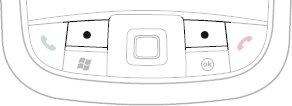
  1. Press and hold the left soft key and the right soft key simultaneously.
    XV6800 Navigation area
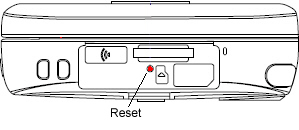
  2. While holding the left and right soft keys, use the stylus to gently press and release the reset button.
    XV6800 Reset Button
  3. When prompted, press the R key on the QWERTY keypad to reset the device.
  4. When prompted, press Space on the QWERTY keypad to restart the device.

Power button during a call on the XV6800

Friday, July 25, 2008


Does your screen go blank while you're on a call? Well, to turn the screen back on, you have to press the power button. None of the other buttons will 'wake' the screen and turn it back on. The power button toggles the screen on and off while you're on a call.

Official ROM Update: Mogul™ by HTC (Sprint)

Tuesday, July 22, 2008

For Sprint users who have the HTC Mogul, you can download the ROM update from HTC here:

http://www.htc.com/us/FAQ_Detail.aspx?p_id=75&act=sd

Where's the update Verizon? Many are waiting. Others are using custom ROM updates.

HTC Wiki

Thursday, July 10, 2008

The Verizon XV6800 is made by HTC. If you want to learn some tweaks, tips, and tricks, then visit the HTC wiki page here:

http://www.htcwiki.com

I personally like this page of tweaks and hacks:

http://www.htcwiki.com/page/Tweaks+and+Hacks?t=anon

Easy Tutorial

Tuesday, July 1, 2008

Looking for an easy tutorial that explains how to flash your ROM?

Take a look here: http://ppc.stoleyour.net/xv6800/

As an update , the new radio ROM dramatically improves the GPS acquisition time.