Showing posts with label GPS. Show all posts

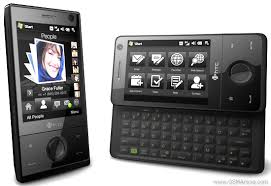
GPS on the HTC Touch Pro

Friday, August 14, 2009


The HTC Touch Pro that I received from Verizon must have had a strange setting because the built-in GPS did not work out of the box. I loaded a custom radio ROM and a custom Windows Mobile 6.5 ROM and the GPS still didn't work! I had to dig through several forums to finally get the GPS to work.

At this point, the built-in GPS is locking to satellites very quickly. It's not receiving assistance from the network because the speed of achieving a GPS lock is the same whether the phone is on or off. I will continue to perform additional tests.

Right now, I'm using Might ROM Windows Mobile 6.5 and I have radio ROM 1.12.34F

I ordered an HTC Touch Pro

Wednesday, August 12, 2009


My XV6900 (Vogue) gets a slow GPS lock because it's not getting assistance from the network.
My XV6800 (Titan) gets a quick GPS lock because it's getting assistance from the network.

I can't seem to get my XV6900 (Vogue) to connect with QPST. I'm unable to find drivers for this phone. I was able to get the XV6800 (Titan) to connect so that I could tweak the aGPS settings.

Well, it appears that it's time for me to move on from the Titan. Therefore, I'm getting the HTC Touch Pro (for free with my "new every two" credit). This device has an unlocked aGPS, so I won't need to flash any custom ROMs. However, since I'd like to run Windows Mobile 6.5, I'll probably still install some type of custom ROM on this device.

Testing the XV6900

Tuesday, August 11, 2009

Yes, I'm now testing the XV6900 (HTC Vogue). I was able to flash a custom radio ROM and a custom Windows Mobile 6.5 ROM. However, I'm having a few issues:
  • the built-in GPS isn't working very well (difficult to get a lock, so I must not be getting any network assistance)
  • the Internet Sharing (for tethering) isn't working (the "connect" option is grayed out)
Will continue to perform a few additional tests...

Verizon unlocks the GPS on the Samsung Omnia

Thursday, July 16, 2009


A software update released by Verizon Wireless now unlocks the built-in GPS in the Samsung Omnia running Windows Mobile. It's about time!

I've had to hack, I mean "modify" my XV6800 so that I can use the built-in GPS chip. Why do you have to disable these Verizon? If the phone manufacturer included a feature like an internal GPS chip, then we (as consumers) should be free to use it. Don't you think?

The HTC Touch Pro now also has an unlocked GPS chip. Users of the Samsung Saga still need to wait. To get the update, visit the Samsung website and look for the CF03 Software Upgrade. Or, visit this link.

Still using my XV6800 as a GPS navigation device

Friday, July 10, 2009

I've had many opportunities to upgrade my phone on Verizon Wireless. However, I'm still using my XV6800 as a smartphone, wireless modem (tethering), and GPS navigation device for driving. I don't know when I'll be upgrading, but I'm trying to wait as long as possible.

The XV6800 has been reliable and although it's a bit on the slow side and it lacks enough RAM to run Opera Mobile, it's still a very good phone.

Verizon Unlocks the GPS on the HTC Touch Pro

Tuesday, June 9, 2009

The title says it all: Verizon Unlocks the GPS on the HTC Touch Pro. If you're a luck owner of the HTC Touch Pro and you haven't flashed the radio or phone ROM to enable the GPS, you're in luck! Users of the Samsung Omnia and Samsung Saga are still waiting for Verizon to unlock the GPS.

Using the XV6800 as a Stand-Alone GPS

Monday, June 8, 2009

I'm tempted to replace my HTC XV6800. I've had it for a while now and although it still works fine, I'd like to have something that has more internal memory so that I can do more web browsing. If I get a new smartphone, perhaps I should use the XV6800 as a stand-alone GPS device in my car. The biggest downside of doing this is that the XV6800 isn't very fast at locking satellite signals when you compare it to other stand-alone GPS systems made by TomTom, Garmin, and Magellan. Also, the XV6800 has a relatively small screen compared to some of the newer GPS navigation systems. So, what will I do? Well, at this point, I'm not committed to replacing this phone, so I guess I'll just wait and see what else comes along.

My Battery is Dead

Sunday, May 17, 2009

I've decided that the original battery on my Verizon XV6800 is now dead. I've had this battery for about 18 months now, but my phone is relatively new because I received a replacement from Verizon.

I have an extended battery so I plan to use that moving forward. I don't think I'll be replacing the original battery anytime soon. Why? Mainly because I use my XV6800 as a GPS quite often and I also use it heavily as a mobile internet device (MID). These services can drain the battery quickly.

So, if I had an iPhone that was also 18 months old, would my battery be dying?

Use Your XV6800 is a GPS

Wednesday, April 22, 2009


If you have an old Verizon Wireless XV6800 (or Sprint Mogul) at home, don't throw it away because you can use it as a standalone GPS. You can turn off the phone service and still use it as a GPS device. Isn't that great to know? You just need to get your hands on some software like TomTom Navigator or Garmin Mobile for Pocket PC/Windows Mobile.

Don't Throw Away Your XV6800. It's a GPS

Tuesday, March 3, 2009

If you decide to upgrade your smartphone someday, don't throw away your Verizon XV6800. It can be used as a standalone GPS device, even if the phone isn't activated or connected to any service plans. Therefore, you could make a TomTom or Garmin out of your Windows Mobile XV6800 and have it as a backup GPS.

Have GPS devices really improved the safety of driving? This is somewhat controversial because some may argue that people are getting into more accidents as they tap on the screen and lose focus on the road. Others may say that people are safer because they're more confident about their driving and they aren't slowing down erratically or making unsafe turns.

Getting the aGPS to work on the XV6800 MR2

Friday, February 20, 2009

The release of MR1 and MR2 for the Verizon XV6800 has complicated things quite significantly. I had to install an older Verizon ROM, then update the bootloader, then install the new radio ROM, then install the new device ROM. Once you do that, then you need to run QPST and change a few settings to enable the aGPS.

Valhalla Legends GPSServer.cab and GC Verizon aGPS.cab

Monday, February 16, 2009

These are essential components if you'd like to enable the aGPS on your XV6800:

Valhalla Legends GPSServer.cab
GC Verizon aGPS.cab

Installing Custom ROM All Over Again to Enable the GPS


I wasn't planning on this, but the 4-way navigation buttons on my XV6800 have failed. Therefore, it's time to go through the circus again and install a new BootLoader, a new radio ROM, and a new custom ROM so that I can use the internal GPS that's disabled by Verizon Wireless.

I'm debating whether I should attempt to install the beta version of Windows Mobile 6.5. I don't have the luxury of spending too much time on this. I mainly need a dependable working phone. I tether and I use the aGPS (assisted GPS) for driving. The aGPS allows for super-fast satellite acquisition.

Going Back to the Stock Verizon ROM for the XV6800

Thursday, February 12, 2009

I need to install the stock Verizon ROM on my XV6800. I've been using a custom ROM that allows me to use the built-in GPS and it's been great. But, it's time for me to go through the steps of installing the original ROM. Can you guess why?

If Verizon hadn't disabled the built-in GPS, then I wouldn't have gone through all the trouble. Now, I have to go through all these complicated steps at the risk of turning my phone into a nice paperweight brick.

Thank goodness for the HTC Titan wiki. The first step is the BootLoader. I've already done that using a microSD card. Now, I need to go through and replace the phone ROM and the radio ROM. Verizon now has both an MR1 and an MR2 ROM update listed on their website so you can get Windows Mobile 6.1 and RevA speeds.

Thankfully, all the newer Verizon phones don't come crippled with disabled GPS chips.

Verizon to unlock the GPS on some smartphones

Thursday, December 18, 2008

It sounds like Verizon Wireless is finally going to allow users to use the GPS on some of its newer smartphones. Unlock the GPS and allow it have access to other GPS navigation software like Google Maps, TomTom Navigator, and Live Search.

I still have the older HTC XV 6800 and since I'm using a modified ROM (thanks to DCD), I'm able to use the built-in GPS with Google Maps (which now has street view for major cities).

Mobile Millennium : traffic based on GPS-based phones

Wednesday, November 12, 2008


Mobile Millennium
is a partnership between Nokia, NAVTEQ, and UC Berkeley, based at the California Center for Innovative Transportation (CCIT), a deployment-focused research center at Berkeley's Institute of Transportation Studies. It is supported by the U.S. Department of Transportation's SafeTrip-21 Initiative and the California Department of Transportation.

Do you live in the San Francisco Bay Area of near Lake Tahoe? Then you should register and participate.


I'm still waiting until we can use GPS-enabled tracking to help me find a parking spot.

Loving my aGPS on my XV6800

Saturday, September 20, 2008


I've been loving my GPS experience using my XV6800. Now that I can get a GPS lock within a few seconds, it's been great. I use my GPS while driving and walking. It's been a great experience and I can't imagine using a smartphone that doesn't have a built-in GPS.

So if all future smartphones come with integrated GPS chips, then who's going to need those stand-alone GPS units like the TomTom and Garmin devices sold at BestBuy?

Working Assisted GPS (aGPS) on the XV6800

Tuesday, September 16, 2008

The folks at XDA Developers have found the "fix" to get the assisted GPS (or aGPS) working properly on the XV6800. Get to this fix by going here

It's great to get an instant GPS lock now. In the past, it may have taken up to a few minutes to get a GPS lock. Now, it's practically instant. This is because the GPS lock is assisted by location data collected through the phone's data network. So even if the sky is cloudy, you'll get a fast GPS lock using the "fixed" assisted GPS chip on the XV6800.

Easy Tutorial

Tuesday, July 1, 2008

Looking for an easy tutorial that explains how to flash your ROM?

Take a look here: http://ppc.stoleyour.net/xv6800/

As an update , the new radio ROM dramatically improves the GPS acquisition time.

Unresponsive GPS? Get GPS Viewer

Thursday, May 1, 2008

My built-in GPS sometimes freezes up or becomes unresponsive. Sometimes it can be difficult to know whether it's really frozen or if it's just taking a while to get a signal lock from all the satellites.

So I'm always using GPS Viewer (http://www.hevis.com.hk/download/GpsViewer1.5.zip)
and when I see no satellites appearing, I simply reset my device, and then I'm back up and running in no time! The satellites appear right away after a quick reset.

GPS Viewer is a must! This FREE utility is really useful.

Here's another tip: sometimes when I open the GPS, it takes a while to lock a signal. But, if I close the GPS, then re-open the GPS, I get a solid blue signal much faster. Not entirely sure why, but it seems to help to toggle the GPS on and off sometimes.

Make sure you set the COM port to COM4. Want a modified version that always starts on COM4? Click here.